
Easily schedule payments for major expenses like taxes, insurance, rent, education fees, and more using your Citi credit card through the Citi Mobile® App. Your recipient does not need to accept credit cards, as the funds will be transferred directly to their local bank account.

Sign On


Your next getaway
starts with Citi PayAll
Turn life's major payments into future travel experiences.
What is Citi PayAll, and How Does it Work?
Citi PayAll allows you to use your Citi Credit Card for major expenses, even where cards are not typically accepted. The process is simple and helps you earn rewards on your largest payments.

Step 1: Set Up Your Payments

Step 2: Pay a Service Fee
A service fee is charged for each transaction, allowing you to unlock the full rewards potential of your credit card on payments that would otherwise not earn you anything.

Step 3: Earn Rewards
Every dollar you spend through Citi PayAll earns you Citi Miles or Points on your card. Use the rewards you accumulate for your next vacation, to redeem brand vouchers, offset purchases, or convert them into a cash rebate.

Mortgage
Your search for an ideal property financing solution ends with Citi Mortgage. Our Mortgage Advisors and Mortgage Client Care Team are committed to partnering you throughout your mortgage journey with us.

Insurance
In partnership with AIA, we help you protect your wealth against unforeseen events in life and safeguard the legacy you want to leave for your loved ones, with our suite of insurance solutions and dedicated insurance specialists.
-

Limited Time Promotion
-
About & How to use Citi PayAll
-

FAQ
Q3-Q4 2026 Promotion
Earn More on Every Payment
Earn a Bonus Cash Rebate when you pay your bills with Citi PayAll, with an even higher rebate for Qualified Citigold Private Client customers (CPC) who are Accredited Investors (AI) and also Citi ULTIMA/Citi Prestige Cardmembers.
Promotion Period: 1 September - 31 December 2026
ALL ELIGIBLE* CARDMEMBERS
Bonus Cash Rebate
0.30%
on Citi PayAll Qualifying Spend
Minimum qualifying spend of S$6,000
QUALIFIED CPC & AI ⋅ ULTIMA/PRESTIGE
Enhanced Bonus Cash Rebate
0.60%
on Citi PayAll Qualifying Spend
Minimum qualifying spend of S$6,000
REWARDS ILLUSTRATION
Got Bills to Pay? Hers's How Much They Could Be Worth.
The example below shows the potential rewards you could earn by paying your bills with Citi PayAll during the Promotion Period.
For illustration purposes only
Sample Rewards Illustration
Credit Card Used: Citi PremierMiles (1.2 Citi Miles for every S$1 local spend)
Rent / Renovation
S$70,000
Wedding Expenses
S$60,000
Insurance Premium
S$6,000
Taxes
S$14,000
Total Spend
S$150,000
All payments made with the fee-paying option via Citi PayAll
Your Rewards Summary
Total Qualifying Spend1
S$150,000
Citi Miles Earned
S$180,000
Bonus Cash Rebate2
S$450
Earn rate: 0.30% (all) / 0.60% (Qualified CPC & AI ULTIMA/Prestige)
Service Fee Charged
S$3,900
Citi PayAll Service Terms and Conditions and *Q3-Q4 2026 Promotion Terms and Conditions apply.
1Qualifying Spend refers to fee-paying Citi PayAll transactions only, Bonus Cash Rebate is capped at the first S$150,000 of Citi PayAll Qualifying Spend.
2Shown at the 0.30% rate for illustration; Qualified CPC & AI ULTIMA/Prestige Cardmembers earn 0.60%.
The Citi PayAll Advantage

Earn Rewards on Every Payment
Turn your large, recurring expenses into valuable miles or points on your favorite Citi Credit Card.

Pay Anyone, Anywhere
Make payments to any local bank account, even if the recipient doesn't accept credit cards.

Schedule and Automate
Set up one-time or recurring monthly payments for up to 24 months and never miss a due date again.
For All Your Big Expenses

Tax
Income Tax, Property Tax, Other Tax Types and Composition Fees to IRAS

Insurance
Insurance premium payments

Rent
Rent and Rental Deposits

Education Expenses
School fees, Enrichment fees, Tuition fees, Course Fees

Electricity Bills
Utility bills for your home

Condominium Management Fee
Set up recurring payments to MCST

Set up with the Citi Mobile® App
Follow these simple steps to set up Citi PayAll on the go.


Log in to the Citi Mobile® App.
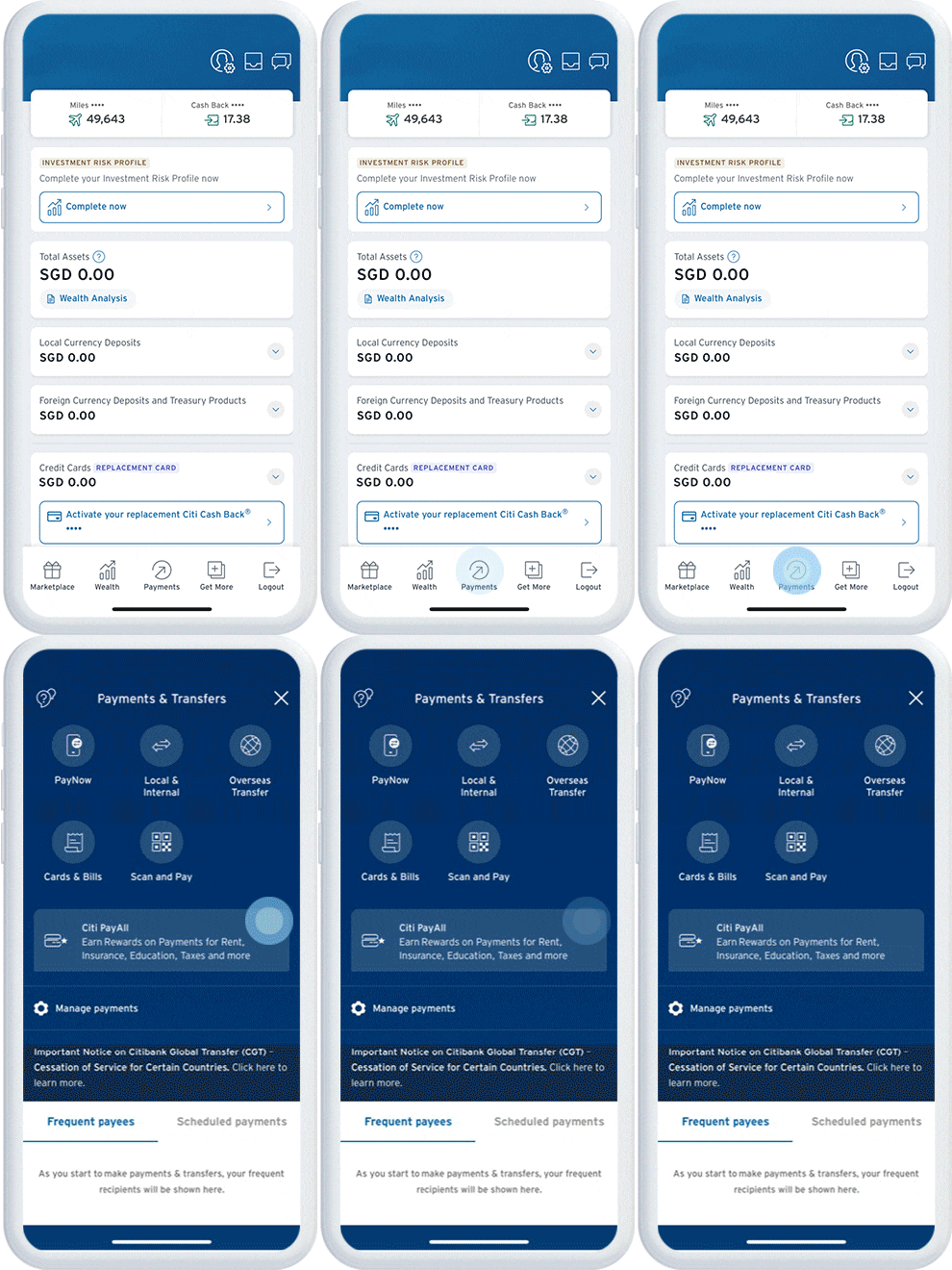

Tap on “Payments” and select “Citi PayAll”.


Tap on “Start using Citi PayAll” and select “Setup Citi PayAll”.


Select a payment category and your preferred payment frequency.


Enter your payment amount, payment date, preferred card type, service fee option, and payment details.


Review and confirm your payment details.


Your Citi PayAll set up is now complete!
TRACK AND MANAGE
Stay in control of your Cashflow with Citi PayAll
Citi PayAll lets you manage your cashflow smartly and stay in control so you don’t miss a payment again.

Track existing payments

Schedule recurring payment and cancel them easily

Get notified every time a payment is made

Citi PayLite
Turn big purchases into small payments

Citi FlexiBill
Turn statements into small payments

Citi QuickCash
Instant cash to get things done right
FAQs on Citi PayAll Q3-Q4 2026 Promotion
The promotion runs from 1 September 2026 to 31 December 2026.
Charge a minimum of S$6,000 in Citi PayAll Qualifying Spend on ONE Eligible Card using the fee-paying option during the Promotion Period.
All Cardmembers earn 0.30%, while Qualified Citigold Private Client (CPC) & Accredited Investor (AI) Prestige/ULTIMA Cardmembers earn 0.60%.
No. Both the Citi PayAll Payment Setup Date and Payment Charged Date must fall within the Promotion Period to qualify.
Your payment must be successfully charged to your Eligible Card on or before 7 January 2027.
You will need to track your own spending. CitiPhone officers are unable to confirm your eligible spend in real-time. Please refer to the Promotion Terms and Conditions for full details.
The Bonus Cash Rebate will be credited to your Eligible Card within ten (10) weeks from the end of the Promotion Period.
The Bonus Cash Rebate is only awarded on ONE Eligible Card, based on the card with the highest qualifying spend.
No. Only main cardholders are eligible; spend by supplementary cardholders will not be counted.
FAQs about Citi PayAll
Citi PayAll is a service that enables Citi Cardholders to make payments to various Payees/Payment Categories using an eligible Citi Credit Card and earn miles or reward points, in exchange for a service fee. It allows you to pay for categories such as rent, education expenses, taxes, condominium management fees, electricity bills, insurance premiums and goods and services. The full list of available payment categories here.
There is an option for payment with zero service fees, however you will not earn any miles or points on these payments.
Your payees do not have to be Citibank customers. They will receive the funds via a bank fund transfer. Please note that Citi PayAll supports payments to local bank accounts only.
1. Child Care Services
2. Club Membership Fees
3. Condo Management Fees
4. Domestic Helper Service Fees
5. Donation or Charity Payment
6. Education Fees
7. Electricity Bills
8. Event Management Fees
9. Health and Wellness
10. Insurance Premiums
11. Maintenance Fees
12. Medical Services and Bills
13. Membership Fees
14. Parking
15. Payment for Retail Goods and Services
16. Professional Service Fees
17. Property Agent Fees
18. Renovation Fees
19. Rent
20. Storage Fees
21. Taxes
22. Telco Services
23. Town Councils
24. Transport Fees
25. Travel Expenses
26. Utilities
27. Wedding Expenses
Citi Credit Cards
- Citi ULTIMA Card (by invitation only)
- Citi Prestige Card
- Citi PremierMiles Card
- Citi Rewards Card
- Citi Cash Back + Card
- Citi Cash Back Card
If you don’t have any of these credit cards, click on the card to apply now.
Yes you can. When setting up your payment, simply choose your preferred payment date, you can choose to make one-time payment or set it as recurring payment for up to 24 months.
Payments take 4 business days to be processed.
It depends on whether you choose Service Fee payment option or Zero Service Fee payment option.
1. Service Fee payment option will allow you to earn reward points or miles or cash back for each payment, at the base earn rate of the card used.
2. Zero Fee payment option here refers to the use of Citi PayAll product without having the customer incur an additional fee for the transaction made. The customer will only be paying the amount in the transaction but will not be receiving any other rewards e.g. base points or miles or additional bonus points or miles or any gift vouchers.
If you have lost your card or reported a fraud on your card, please contact CitiPhone Banking at +65 6225 5225 between 8 a.m. and 8 p.m to check on your card account payment transactions status.
You should NOT make payments under Citi PayAll in respect of (i) any loan/debt repayments such as but not limited to mortgage repayments, credit card payments and loans, (ii) any cryptocurrency related transactions, gambling and casino-related transactions or such other transactions that we may determine at our discretion
Thanks for participating in the recent campaign, you will receive your Bonus Cash Rebate within 12 weeks from 28 Feb 2026.
Thanks for participating in the recent campaign, you will receive your Bonus Cash Rebate and Gift within ten (10) weeks from 31 July 2026.
FAQs related to Citi PayAll Payments
You can transact an amount not exceeding 95% of your permanent credit limit, subject to the maximum permissible monthly limits below. The aggregate sum of Citi PayAll payments within the calendar month must not exceed your permanent credit limit.
i. Education Fees: S$100,000
ii. Insurance Premiums: S$200,000
iii. All other categories except for Taxes: S$30,000 per category
Click here to view the full list of payment categories.
Please click here for the full list of MCSTs supported by Citi PayAll.
You will receive an email, Push Notification, or SMS notification alert when your payment is set up and when it is successfully charged to your card. Successful payments will also appear in your credit card statement. For recurring payments, you will receive a notification each month when the payment is processed.
If your payment fails, you will be notified via email, Push Notification, or SMS. Please make alternative arrangements to ensure your recipients is paid on time.
No, if your payment fails, both the payment amount and the accompanying service fee (if the Service Fee payment option was selected) will be refunded to your card.
If you made an accidental payment to the wrong recipient which was processed successfully, both the payment amount and the service fee (if the Service Fee payment option was selected) will not be refundable. The payment will still appear on your credit card statement. As Citi PayAll does not perform independent verification of payee account details, reference numbers, or other payment information provided by you, please ensure that all payment details are entered accurately.
Since all Citi PayAll payments are not processed through card associations (for example, Mastercard or Visa), their chargeback dispute resolution processes are not applicable. This means you will not be able to raise a chargeback dispute for any payment. Any disputes or claims must be resolved directly with the payee.
Once your payment setup has been confirmed, it cannot be amended.
However, you may cancel the payment setup before the payment is charged to your card. To do so, please follow the steps below:
Step 1: Log in to Citi Mobile® App.
Step 2: Tap on "Payment" and select "Citi PayAll".
Step 3: Tap on "Start using Citi PayAll" and you will be able to see all active Citi PayAll setups.
Step 4: Select the payment setup(s) that you wish to cancel and tap on "Cancel payment instruction" to proceed with the cancellation.

Terms & Conditions:
- Citi PayAll Q3-Q4 2026 Promotion Terms and Conditions apply, click here for more details.
- Citibank PayAll Service Terms and Conditions apply, click here for details. Please note that cardmembers should not overpay their taxes.
Important Notes
Accredited Investors are assumed to be better informed, and better able to access resources to protect their own interests, and therefore require less regulatory protection. Investors who agree to be treated as Accredited Investors therefore forgo the benefit of certain regulatory safeguards. When the bank deals with Accredited Investors, Citibank is exempt from complying with certain requirements under the Financial Advisers Act, 2001 (“FAA”) of Singapore and the Securities and Futures Act, 2001 of Singapore, and related regulations, notices and guidelines that are meant to provide regulatory safeguards to retail clients. This includes, but is not limited to, a number of business conduct requirements such as Disclosure of Product Information (Section 34 of FAA), Reasonable Basis for Investment Recommendation (Section 36 of FAA), and Disclosure of Certain Interests in Securities (Section 45 of FAA), and which sections client cannot rely upon in relation to any civil claim against Citibank or a Citigroup company. Investors should consult a professional adviser if they do not understand any consequence of being treated as an Accredited Investor.
As an Accredited Investor, client is responsible for any and all suitability and reasonableness decisions on investments, including any advice on product suitability received from Citibank. Learn more about the effects of being treated as an Accredited Investor at www.citibank.com.sg/accdinv > Schedule 2.
Please note the application for Accredited Investor status is approved at the sole discretion of Citi. For more detailed information on the Accredited Investor eligibility and definitions, please refer to www.citibank.com.sg/accdinv for more information.
Earn up to 0.60% Bonus Cash Rebate for every S$1 spent* on Citi PayAll fee-paying transactions. *T&Cs apply.

Download the Citi Mobile® App


Citibank Singapore Ltd Co.Reg. No. 200309485K
Copyright © 2026 Citigroup Inc.